Most people who decide to start a podcast on YouTube arrive with a similar picture in their head. They want to talk, they want to bring other people into the conversation, and they want the whole thing to live somewhere an audience can actually find it. The barrier to entry is lower than it looks. A phone, a quiet room, and a clear plan are enough for a first episode. What separates shows that grow from shows that quietly stop after six uploads is rarely equipment. It is the decisions made before the recording button is pressed.
Why YouTube Works as a Podcast Home
Publishing on YouTube puts a show inside a platform where viewers already go looking for long conversations, interviews, and discussion. The video layer carries information that audio alone loses: facial expressions, laughter, pauses, and reactions. That makes the platform a natural fit for interview shows and co-hosted formats where the chemistry between two people is part of the appeal.
There is also a practical advantage for beginners. A channel gives you one place for full episodes, shorter clips, a subscription feed, and a search surface, rather than several disconnected systems you have to learn at once. Uploading a video podcast also means the episode can be discovered by people who were not already podcast listeners, which widens the pool beyond the audio audience.
Step 1: Define the Niche and the Target Audience
Before naming the show or buying anything, get specific about who the episodes are for and what they will get out of listening. A podcast about "business" competes with everything. A podcast about how small shop owners handle slow seasons speaks to a recognizable person with a recognizable problem, and that person can be found, invited, and served.
Answer these questions in writing before episode one:
- Who is the listener, and what do they already know about the topic?
- What question should every episode help answer?
- What can you offer that a general audience show cannot?
- Who could you realistically interview in the first two months?
- What will a listener be able to do after an episode that they could not do before?
Write the answers down and keep them. They become the filter for every future guest, topic, and title.
Step 2: Choose a Format That Fits Your Energy
The format drives everything downstream: how long an episode runs, how much preparation is required, and how hard editing becomes. Pick one and commit to it for a batch of episodes rather than changing structure every week.
| Format | What it demands | Works well for |
|---|---|---|
| Solo commentary | Strong opinions or clear teaching, plus scripting discipline | Beginners with no guest network yet |
| Interview | Guest booking, research, and questions prepared in advance | Hosts who enjoy drawing stories out of people |
| Co-hosted conversation | A reliable partner and a shared schedule | Hosts whose chemistry is the main attraction |
A mixed approach also works: solo episodes to establish your own voice, interviews to bring in new perspectives and new audiences. Many new hosts start with interviews because guests bring their own reach, but the booking effort is real and should not be underestimated.

Step 3: Pick a Name and Set Up the Channel
A podcast name should be easy to say out loud, easy to spell after hearing it once, and not so close to an existing show that people confuse the two. Test it by saying it in a sentence: "This week on [name], my guest is..." If it sounds awkward spoken, it will sound awkward in a title.
The channel itself is created through a Google account. Give the channel a clear description that states what the show is about, who it is for, and how often episodes appear. Add a simple banner and profile image so the page looks intentional rather than abandoned. Small signals of care matter because a new viewer is deciding in seconds whether the show is worth their time.
Step 4: Build a Barebones Equipment Kit
Beginners frequently assume that decent audio requires a full studio. It does not. Starting with a phone is a legitimate path, and plenty of shows begin that way and upgrade once the format is proven. The order of priority is simple: clean audio first, stable framing second, lighting third.
Starting With Just a Phone
Record video in a quiet room, keep the phone steady on a stand or a stack of books, and get the microphone close enough that the room noise does not compete with the voice. Do not record in a large empty space with hard walls if a smaller, softer room is available. A room with a rug, curtains, or soft furniture reduces echo, and that single change often improves perceived quality more than a new microphone would.
What to Add Next
Once the format feels settled, add an external microphone for each speaker and a simple light source positioned in front of the faces rather than behind them. A dedicated stand and a clean background come after that. Upgrade one piece at a time so you can hear the difference each change makes.
Step 5: Prepare the Room and the Recording Workflow
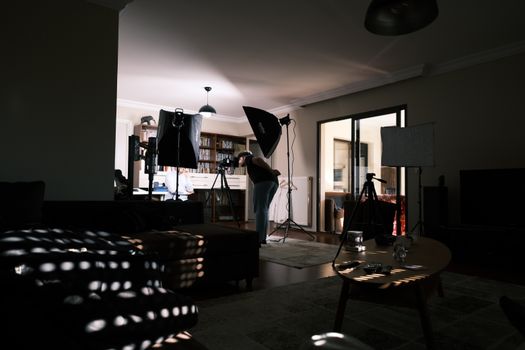
Consistency comes from routine. Run the same checklist every episode so that a technical oversight never wastes a guest's time.
- Close windows and silence notifications on every device in the room.
- Test levels with both speakers talking at once, not one at a time.
- Record a short test clip and play it back before the conversation starts.
- Frame each person at eye level with space above the head.
- Keep water within reach and a notepad for follow-up questions.
- Record a few seconds of silence with the room empty for editing later.
Run a backup recording whenever it is possible. A second capture on a phone is cheap insurance against a lost file, and it turns a disaster into an inconvenience.
Step 6: Edit for Both the Ear and the Eye
Editing a video podcast is different from cutting a highlight reel. The goal is momentum, not spectacle. Remove the setup chatter, cut long pauses, and trim any segment where the conversation circles without moving forward. Keep the natural reactions, since laughter and quick exchanges are exactly what makes a video podcast feel alive.
Add clear audio, sensible volume balance between speakers, and readable titles or captions if your editing tool supports them. Watch the finished cut at normal speed once before publishing. If your attention drifts, the audience's attention will drift too.
Step 7: Publish With a Repeatable Episode Template
Every episode should look like it belongs to the same show. That means a consistent title pattern, a recognizable thumbnail style, and a description that tells a browsing viewer what the conversation covers and who the guest is. A short summary at the top, followed by chapter markers for longer conversations, helps viewers jump to what interests them.
Organize episodes into a playlist so the channel reads as a series rather than a pile of unrelated uploads. Episode numbering helps regular listeners follow along and signals that the show is ongoing. Guests should receive a link as soon as it is live, along with a ready-made message they can share.
Step 8: Plan for Discovery and Consistency
Nobody finds a new show by accident, which is why the first months require deliberate effort beyond uploading. Cut short clips from each long episode and publish them separately so people can meet the show in a small dose before committing to a full conversation. Invite guests who have their own audiences and make sharing easy for them.
A schedule you can actually keep beats an ambitious one you abandon. Weekly is common, but a fortnightly show that always appears on time builds more trust than a weekly show that vanishes for a month. Choose a cadence, announce it, and protect it.

A Practical First-Month Plan
Week one: settle the niche, format, and name, then write the channel description. Week two: record a short pilot with no guest and review it honestly for audio, framing, and pacing. Week three: record and publish episode one with a guest, using the checklist. Week four: publish two short clips from that episode, send the links to your guest, and choose the date and guest for episode two.
Four weeks is enough to learn whether the format feels sustainable before any money is spent on equipment.
Mistakes That Slow New Podcasts Down
- Waiting for perfect gear instead of publishing a first episode.
- Choosing a topic so broad that no specific listener feels addressed.
- Skipping guest research and letting the conversation drift.
- Uploading full episodes with no clips or promotion around them.
- Changing the format and design every week so the channel never looks coherent.
- Recording in an echo-heavy room and assuming editing will fix it.
Frequently Asked Questions
Can you start a podcast on YouTube with only a phone?
Yes. A phone in a quiet, soft-furnished room can produce a publishable first episode. Keep the device steady, get close enough to capture clean voice audio, and test the recording before a guest joins. Many hosts start with one device and add microphones or lighting only after the show has a repeatable format and a small regular audience.
Should a podcast be audio-first or video-first on YouTube?
On YouTube the video is the main experience, so plan for it from the start. Frame speakers at eye level, keep the background tidy, and remember that expressions and reactions are part of what viewers came for. Bonus audio feeds can come later; the recording itself should be filmed with a watching audience in mind.
How long should a podcast episode be?
Length should follow the conversation, not a fixed target. A tightly edited twenty minutes holds attention better than an hour padded with slow sections. New hosts often find shorter episodes easier to produce and easier for new viewers to try. As your audience grows, you can let longer interviews run if the material earns the time.
Do you need a co-host or a guest to begin?
No. Solo episodes are a strong way to establish the show's voice before inviting anyone else into it. They remove scheduling friction and let you practice framing, audio, and editing without pressure. Once the workflow feels comfortable, bringing in guests adds fresh perspectives and introduces the show to their audiences.